An option. Tenancies belongs to letting management, which an organisation switches on under Settings, Organisation. Without it the page is not there at all, and the door phone underneath carries on as normal.
Tenancies, rent and deposits
Signing somebody up gives them the door. A tenancy is the agreement behind it: the term, the rent, the deposit and the papers a landlord has to serve. Starting one on Tenancies does both at once, so nobody ends up with a tenancy and no way through their own front door.
Where it lives
Tenancies sits under Apartments in the sidebar, with Turnovers, Rates and the Calendar. Rates is for letting a flat out on a price card, by the night, the week or the month; Tenancies is the agreement with somebody who lives there. A flat can be used either way, but not at the same time: a flat with a tenancy running is not offered to short stays.
Starting one
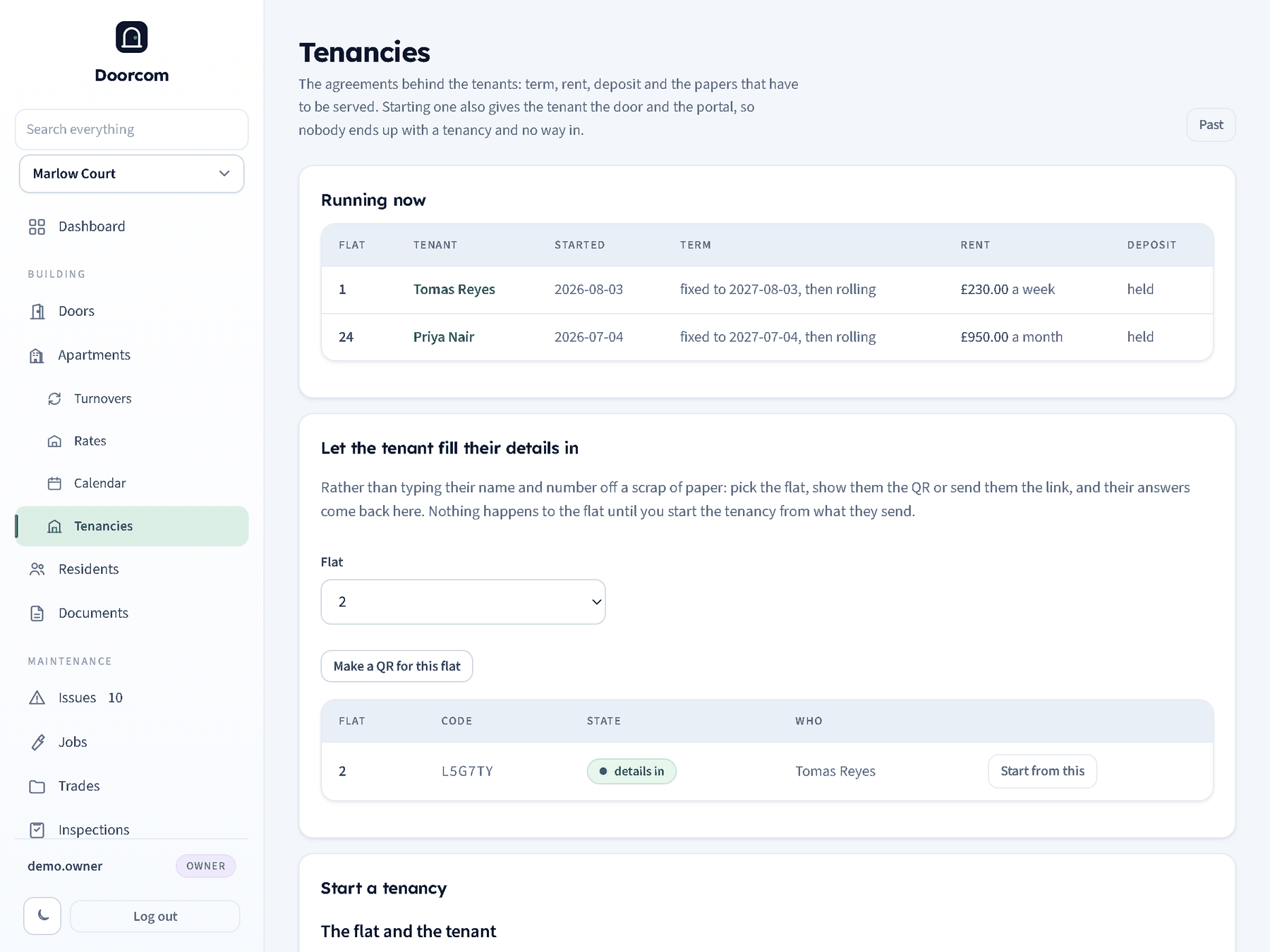
The top of the page lists what is running now: flat, tenant, start date, term, rent and whether a deposit is held. Past in the corner shows the ones that have ended, with the reason. Below is the start form.
- The flat and the tenant
- Only flats with no tenancy running are offered. The name is the tenant's; the mobile is how they sign in to the resident portal and how the door reaches them, so a tenancy without one leaves them no way in. An email is enough on its own if they would rather not give a number, but then the door cannot ring them.
- The term
- Starts on can be in the past, which is how an existing tenant is brought across. Fixed term (months) works out the date the fixed term ends; zero means there is no fixed term. Carries on periodically after the fixed term is the usual arrangement in England and Wales. Notice (days) is recorded for reference; Doorcom does not serve notices.
- Money
- Where the rent comes from, which depends on the flat — see below. Due on day is the day of the month (or 1 to 7 for a weekly tenancy) the rent has to be with you; leave it blank to use the day the tenancy starts. Deposit taken records the money as held.
Starting the tenancy creates the tenant as a resident of that flat, so the poster, the bell and the portal work for them straight away, and writes the agreement and the deposit. The change log records it. A flat that already has a tenancy running is refused rather than let twice.
Letting the tenant fill their own details in
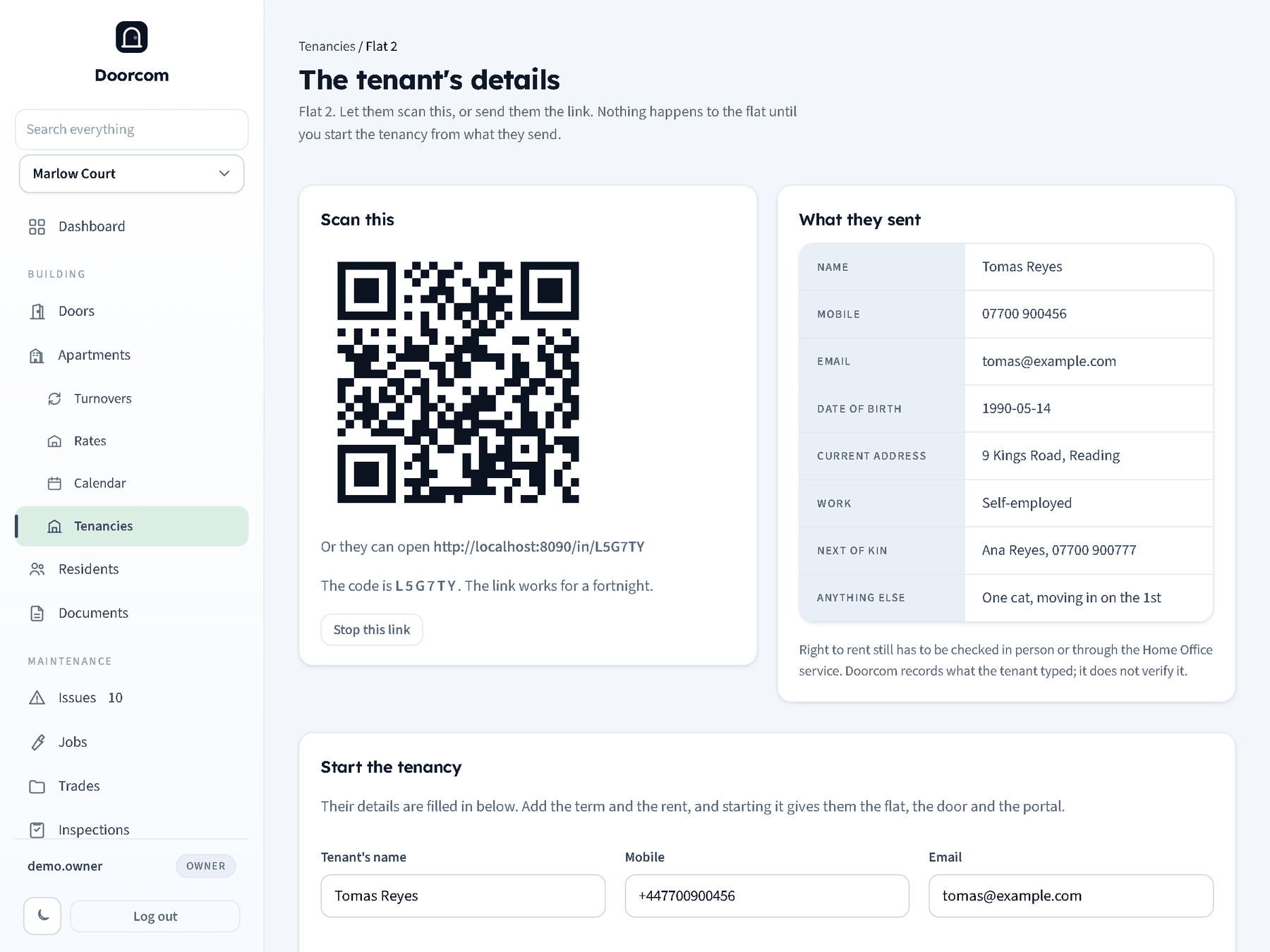
Typing somebody's name, number and next of kin off a scrap of paper is how the office ends up holding a wrong mobile for the person whose door it rings. On Tenancies, Make a QR for this flat creates a link for one flat: show the tenant the QR, or send them the link or the six character code. They open it on their own phone and fill in their name, mobile, email, date of birth, where they live now, what they do and who to call in an emergency.
Their answers come back to the same page. Nothing about the flat changes until somebody in the office presses Start the tenancy, with the details already filled in, so a link that reaches the wrong person wastes a form rather than handing out a front door. The link lasts a fortnight, can be stopped at any time from its page, and stops working the moment a tenancy is started from it. Right to rent still has to be checked properly: Doorcom records what the tenant typed, it does not verify it.
The rent comes from the flat
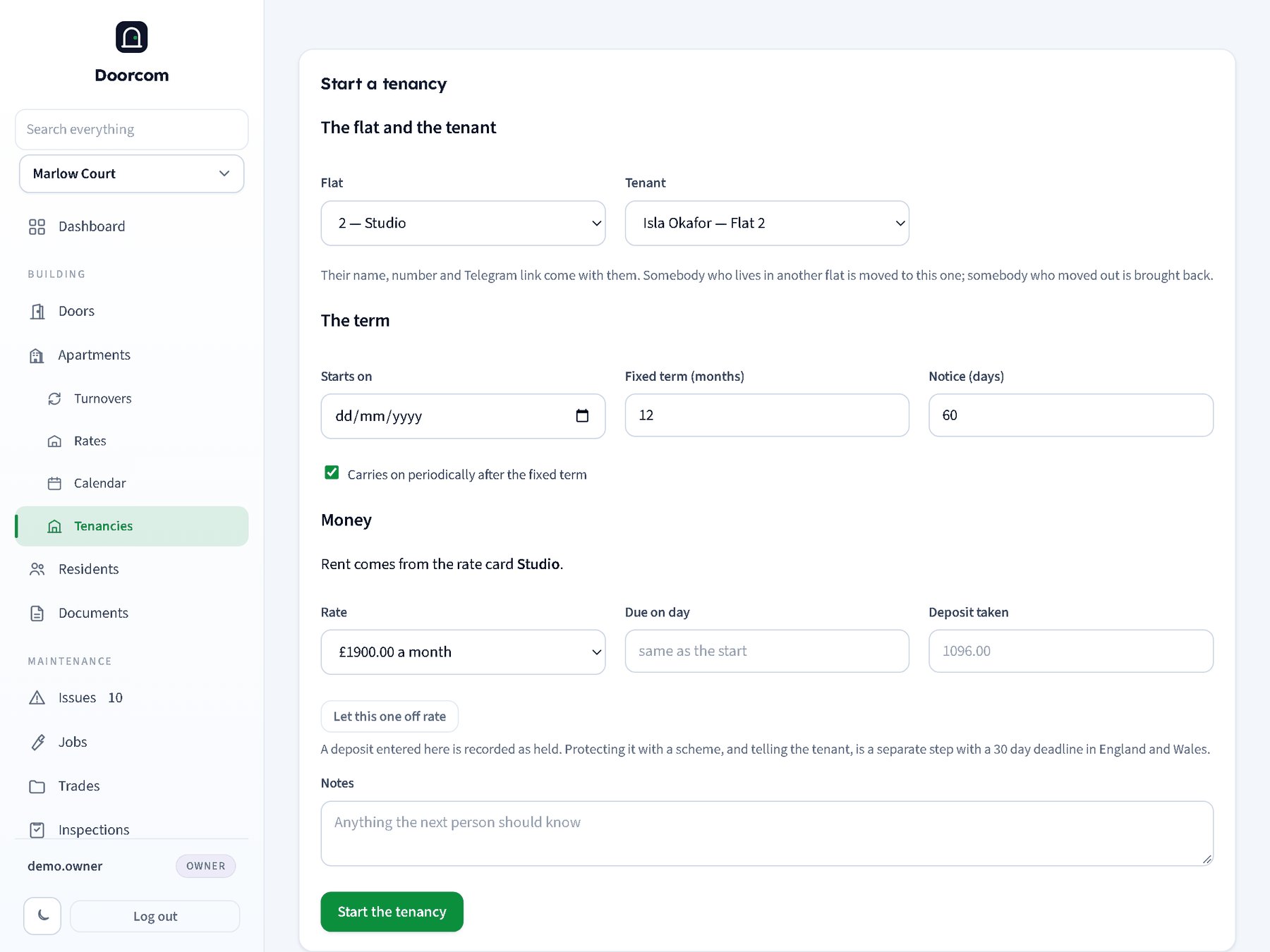
A flat on a rate card is let at the card's price. Pick the flat and the card's name appears next to it in the list, the Money section says which card the rent comes from, and Rate is a dropdown of the ways that card is sold: by the month, by the week, by the night. There is no rent box, because there is nothing to type.
A flat on no card has the rent box as usual, with the same month, week or night dropdown beside it.
Let this one off rate brings the rent box back for a flat that is on a card, for the let that is done at a different figure. The card's price is filled in as a starting point and can be changed, and a link puts the flat back on the card price if the button was pressed by mistake.
The price is read from the card when the tenancy is written, not taken from the page, so a form left open while somebody changes a price cannot write the old one. Changing a card's price later does not change a tenancy that has already started: that rent is part of an agreement, and a rent rise is its own act.
A nightly tenancy invoices a night at a time, which is what it means. For a stay of a few nights, take a booking instead.
The tenancy page
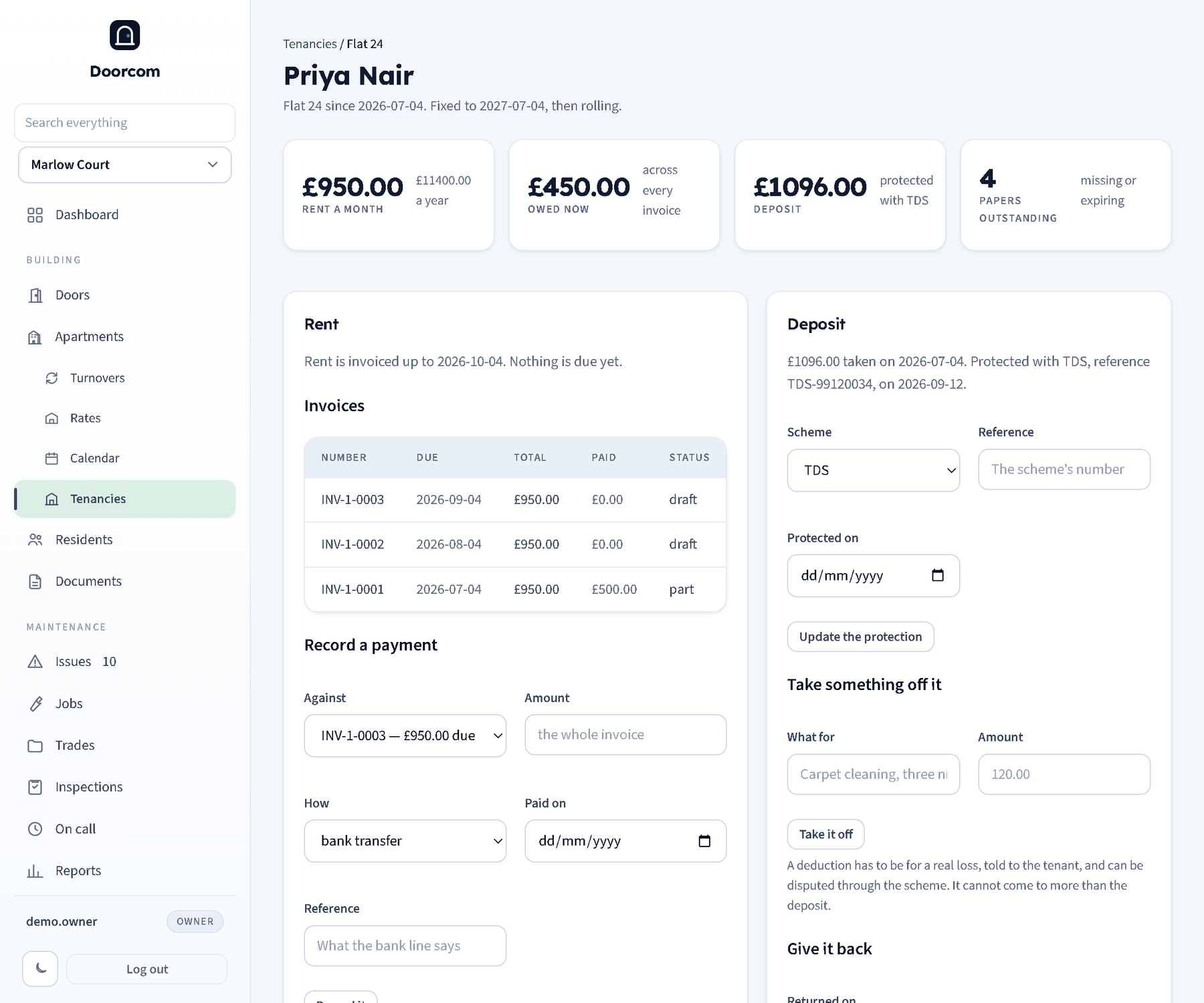
Four figures across the top: the rent (and what that is a year, so a weekly tenancy can be compared with a monthly one), what the tenant owes across every invoice, the deposit and whether it is protected, and how many of the required papers for that flat are missing or expiring.
Rent
Rent is invoiced one period at a time. A period counts as due the moment it starts, because rent is paid in advance. Any period that has started and has not been invoiced is listed with a Raise the rent invoice(s) button; pressing it writes one invoice per period and moves the marker, so pressing it twice does not invoice the same month again. Doorcom also does this by itself every hour, so a tenancy left alone keeps its own books.
Rent invoices go out as issued rather than sitting in drafts, and carry no VAT: residential rent is exempt. Short stays are different, and are invoiced with VAT at the standard rate.
Payments
Record a payment puts money against one of the tenant's invoices: the amount (leave it blank for the whole invoice), how it arrived, the date and a reference such as the bank line. The invoice moves to part paid or paid, and what is owed at the top comes down.
The deposit
The deposit taken at the start is recorded as held. Protecting it is a separate act: choose the scheme, put in its reference and the date, and Doorcom keeps it with the tenancy. In England and Wales a deposit has to be in an approved scheme, and the tenant given the prescribed information, within 30 days of taking it; the penalty for missing that falls on the landlord, which is why the field is next to the deposit rather than in a finance page. The certificate itself is a document: upload it against the flat from Documents.
Papers
The paperwork for that flat is listed with its state, taken from the same checklist as the Documents page. A tenancy whose papers were never served can be hard to end, so anything missing is worth clearing early.
What the tenant sees
The same facts from their side: the terms, the deposit and its scheme, what they owe, the invoices and how to pay. It is on their own portal under Your tenancy, described in The resident portal. Nothing there can be changed by the tenant, and a draft invoice stays out of it until it is raised.
Ending one
End this tenancy takes the date it ended and the reason. Ticking Move the tenant out too at the same time stops the door ringing them and frees the flat; their record is archived rather than deleted, so the history stays. Rent stops at the end date even if invoicing is run later. The deposit is still held: return it, with any deductions, from the deposit.