An option. Reports come with letting management or issue management: an organisation with either one switched on has them, and only a door phone on its own does without. Which reports are on the menu follows the options too.
Reports
Two things live under Reports. The monthly report is a fixed page of a month's numbers, per building, printable and emailed on the first. Run & share is the menu of reports you run over a window of your choosing, print as a PDF, hand to somebody as a link, or have emailed on a schedule.
The monthly report
Reports lists the months, newest first. Open one and it covers rings (by door, with opened, declined, no answer and messages left), issues (opened, fixed, still open, and the median time to fix), jobs sent to trades, inspections and documents, and messages and on-call alerts. A month that is not over yet is worked out up to now.
Nothing is stored: the figures are computed from the tables each time, so an old month always comes out the same. Each month has a .csv of the same numbers for a spreadsheet, and the page prints as it stands. Owners and managers are emailed a link on the first of the month.
Run & share
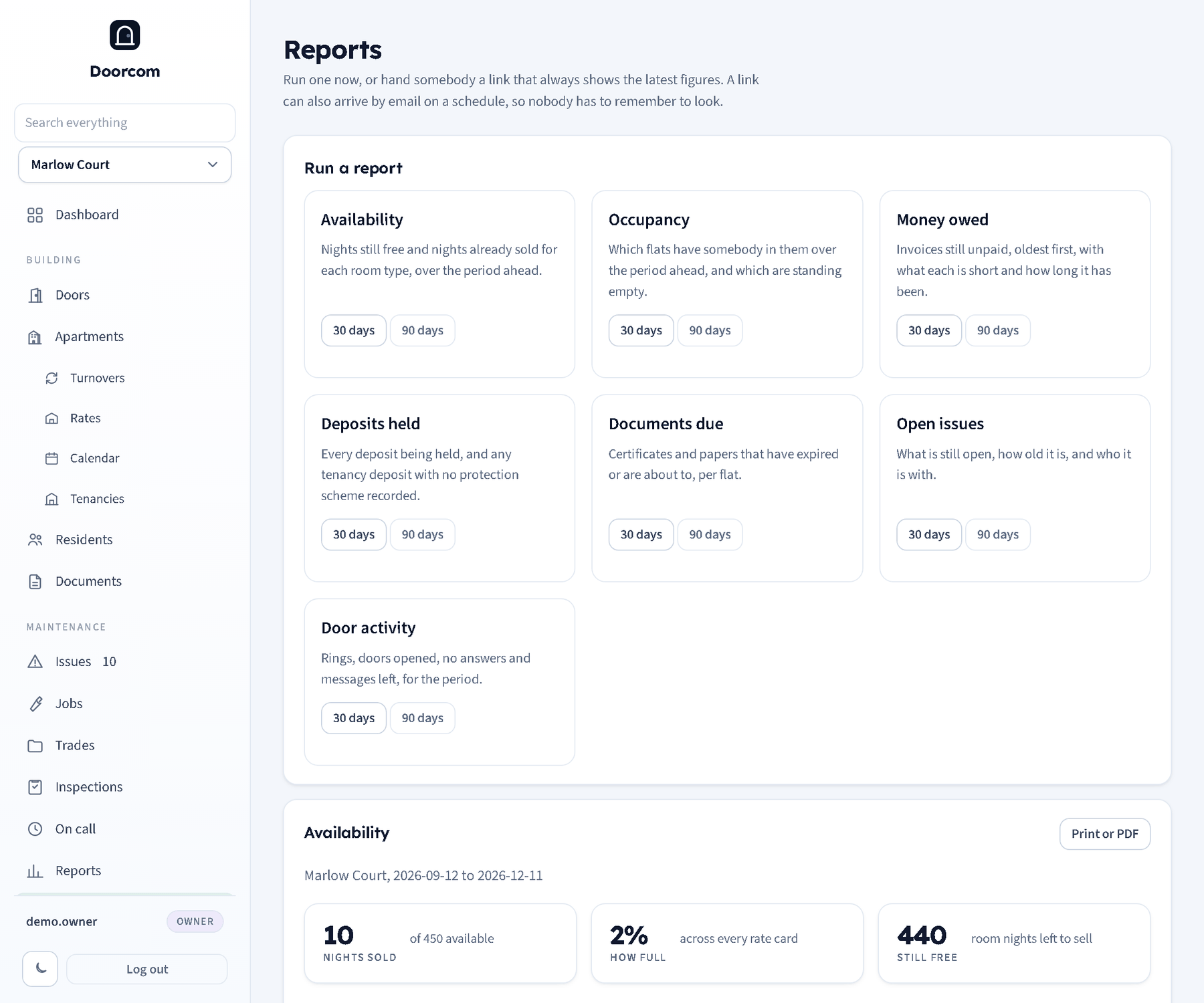
Each report is a building and a window turned into a title, a handful of headline figures and a table. The menu shows what this organisation can use:
- Availability
- Nights still free and nights already sold for each rate card, over the period ahead.
- Occupancy
- Which flats have somebody in them over the period ahead, and which are standing empty.
- Money owed
- Invoices still unpaid, oldest first, with what each is short and how long it has been outstanding.
- Deposits held
- Every deposit being held, and any tenancy deposit with no protection scheme recorded.
- Documents due
- Certificates and papers that have expired or are about to, per flat.
- Open issues
- What is still open, how old it is and who it is with. Needs issue management.
- Door activity
- Rings, doors opened, no answers and messages left for the period. Always there.
Some of these look forward and some look back, and each one knows which it is: what is free to sell is a question about next month, what was rung is a question about last month. The window is 30 or 90 days from the buttons, or any number of days up to 400 in the address bar (/reports2?run=availability&days=180). Dates are worked out in the building's own timezone, so "today" means today there.
Print or PDF
Print or PDF opens the report as a clean printable page with the building, the period and the figures, and no panel furniture around it. Print it, or choose "Save as PDF" as the printer, which every current browser offers. Doorcom does not carry a PDF library of its own: the browser already has one, and a dependency that has to be kept patched is a poor trade for a button.
A link for somebody with no login
Share this one makes a link carrying an unguessable token. Whoever opens it sees the same report, worked out again each time, with its own print button, and never sees the panel. That is how an accountant, a landlord or a cleaner gets exactly the one page they need without a login and without being able to wander.
There is no password behind it, so send it only to people who should see the building's figures. Every link is listed at the bottom of the page with what it is, its period, where it is emailed and when it last went; removing one stops it working immediately.
Having it emailed
The same form takes one or more email addresses and a schedule: never (just the link), every day, every Monday, or on the first of the month. The email carries the report as text with the link at the bottom, so it is readable on a phone and still one tap from the full page.
Sending is checked every hour and goes out once a day per link at most, so a restart cannot double up. The link in the email needs the public address to be configured, which is part of Hosting and backups; the email itself goes through the SMTP settings in Settings.