An option. The money side belongs to letting management, which an organisation switches on under Settings, Organisation. Billing for Doorcom itself is a different thing and is always there: see Billing.
Money and payment accounts
Rent, stays, deposits and what is owed are kept in Doorcom rather than in a separate ledger, so the flat, the tenant and the invoice are the same records. This chapter is how the money side is put together: invoices and their VAT, payments, deposits from taken to returned, and which of an organisation's bank accounts a property's money goes into.
Invoices
An invoice belongs to a building and to whoever owes it: a tenant, or a guest and their booking. It is numbered within the building, so each property's invoices run INV-1-0001, INV-1-0002 and so on rather than sharing one run across the whole organisation.
Every invoice carries lines, and each line carries its own VAT rate, because the two kinds of letting are not taxed the same way:
- Residential rent is exempt. Rent invoices are written with no VAT at all.
- A short stay is standard rated. Holiday and serviced accommodation carries VAT at the usual rate.
Everything is held in whole pence, never in fractions of a pound, and VAT is rounded half up on each line so a credit rounds the same way as the charge it reverses. Whether a particular landlord has to charge VAT at all is a question for their accountant; Doorcom does the arithmetic it is told to do.
An invoice is in one of five states. Draft is not yet demanded; sent has gone out; part and paid are worked out from the payments against it, not set by hand; cancelled is out of the reckoning and stays on the record. Rent raised from a tenancy skips draft: rent is demanded by the agreement, not drafted for approval.
Payments
A payment is recorded against an invoice with its amount, how it arrived (bank transfer, Direct Debit, card, cash or open banking), the date and a reference such as the line off the bank statement. The invoice moves itself to part paid or paid, and what the tenant owes comes down. Money that arrives without an invoice to sit against is held on the account.
The tenant sees the other side of this on their own portal: what is outstanding, each invoice, and the bank details for the property with the reference to quote. Today a payment is recorded on the tenancy, next to the invoices it belongs to: see Tenancies, rent and deposits. What is outstanding across a whole building is the Money owed report, oldest first, in Reports.
Deposits
A deposit has a life of its own, and in England and Wales it has deadlines attached, so Doorcom keeps each stage separately rather than as a number on a tenancy.
- Taken
- Entered when the tenancy starts, or against a booking. It is recorded as held: money you have, not money you have earned.
- Protected
- The scheme (TDS, DPS, mydeposits, SafeDeposits Scotland), its reference and the date. A tenancy deposit has to be in an approved scheme, and the tenant given the prescribed information, within 30 days of taking it. Doorcom records that it happened; the certificate itself is uploaded as a document against the flat.
- Deductions
- Anything taken off before it goes back, each with what it is for and how much. The total can never come to more than the deposit. A deduction has to be for a real loss and has to be put to the tenant; the scheme's own adjudication settles a dispute, not this page.
- Returned
- Recorded with the date. What goes back is the deposit less the deductions, and the deposit is then closed.
The Deposits held report lists everything being held and flags any tenancy deposit with no protection scheme recorded, which is the one that costs a landlord money.
Payment accounts: Settings, Payments
This tab is for owners. A manager runs the money on a property without ever seeing, or being able to change, where it lands.
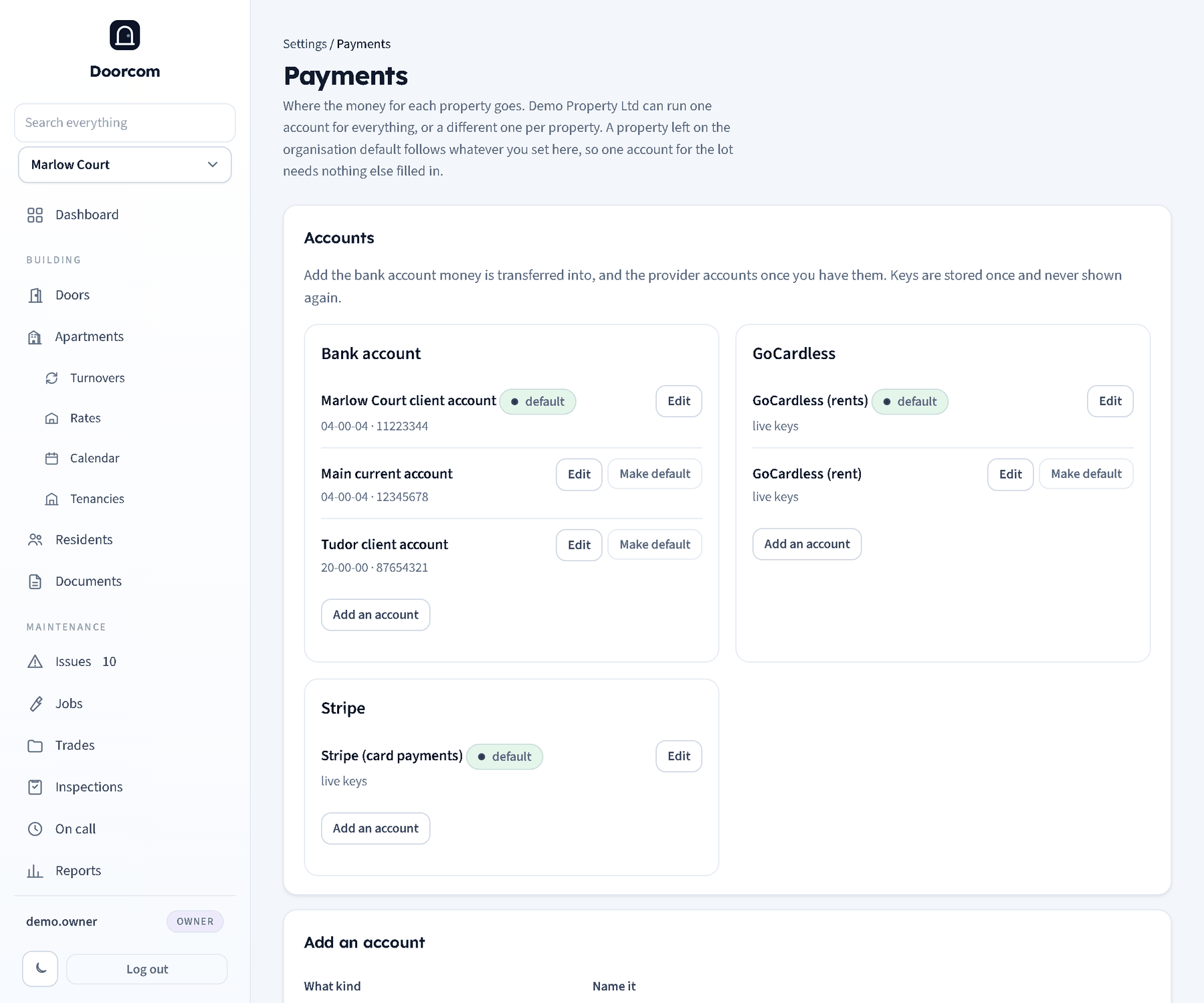
An organisation may run one bank account for everything it owns, or a different set per building, or any mixture: a managing agent often holds a separate client account per landlord, while a single owner uses one account for the lot. So the accounts belong to the organisation, and each property may be routed to one of them.
There are three kinds: a bank account for transfers and standing orders, GoCardless for Direct Debit, and Stripe for cards. An account has a name for your own use, the details the payer needs (account name, sort code, account number, bank, the reference to quote) and, for the two providers, their keys.
Use this by default for every property of this kind is what makes the common case easy: add one account, mark it default, route nothing.
The matrix
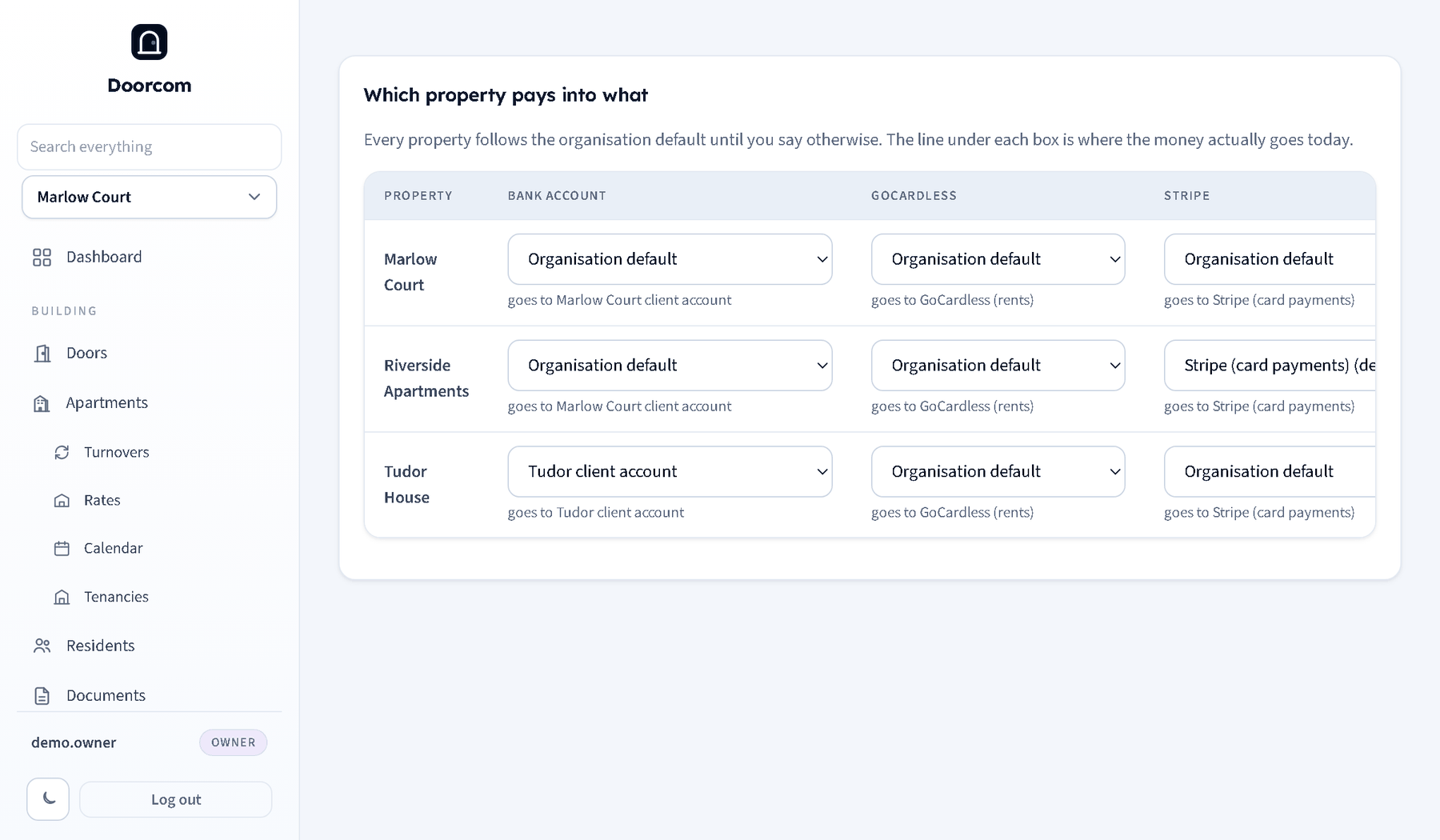
Properties down the side, the three kinds across the top. A cell left on organisation default follows the default, and the cell says which account that actually is, so there is no guessing. Change a cell and that property's money of that kind goes to the account you picked. When money has to be collected, Doorcom looks for the property's own route, then the organisation's default for that kind, and finally, if there is exactly one account of that kind and no default was ever set, it uses that one rather than pretending the organisation has no bank account.
Keys and secrets
API keys, secrets and webhook secrets are write-only: they go in, they are never rendered back out, and leaving the field blank on save keeps the stored one. Each has a tick box to clear it. They sit in the database in the clear, as every other credential in Doorcom does — anyone holding the database file holds the building's doors as well, so the file is the thing to protect. See Hosting and backups.
Removing an account leaves anything routed to it following the default instead, rather than leaving a property pointing at nothing.